
Scripting & MCP
While DarkRay runs, an AI assistant or a Python script can work in it for you: find photos, rate and tag them, change their edits, look at the result, merge brackets and export. You ask in plain words (“rate every sharp frame from Saturday three stars”), or you write a script that does the same thing to a thousand photos.
What an assistant or a script can do
Section titled “What an assistant or a script can do”Each thing it can do is an MCP tool, an entry an assistant calls by name, such as
search_photos. There are 23, in six groups:
| Group | It can |
|---|---|
| Read | Search with DarkRay’s search syntax, read a photo’s details and edit values, see what DarkRay shows, list catalogs, folders, collections, presets and looks, see a photo as edited, find exposure brackets, check jobs |
| Catalog | Open a catalog, import a folder’s photos where they are |
| Curate | Set ratings, color labels, pick and reject flags, captions and keywords, change collections and the Quick Collection, show photos in DarkRay |
| Edit | Change edit values by name, reset sections, apply a preset or a look, copy edits, make virtual copies |
| Merge | Merge groups of RAWs to HDR, panorama or HDR panorama |
| Export | Export to JPEG, PNG, TIFF or EXR, stop a running job |
Edits go to each photo’s Base layer. Layers and masks are out of reach for now.
Everything can be undone
Section titled “Everything can be undone”An assistant or a script works through the same commands as DarkRay’s menus, so you can take back anything it does:
- Each call that changes photos is one step. In the grid, Image › Undo (Ctrl+Z) takes it back, and the menu marks it, for example Undo Rating (assistant).
- A change to the photo open in Edit is one step in that photo’s own undo history.
- Changes go only to the catalog DarkRay shows, whose history holds the Undo.
- Nothing is deleted, moved or renamed. Imports and merges add photos rather than change them, so Undo doesn’t take them back; Image › Remove from Catalog… takes them out.
Two ways in
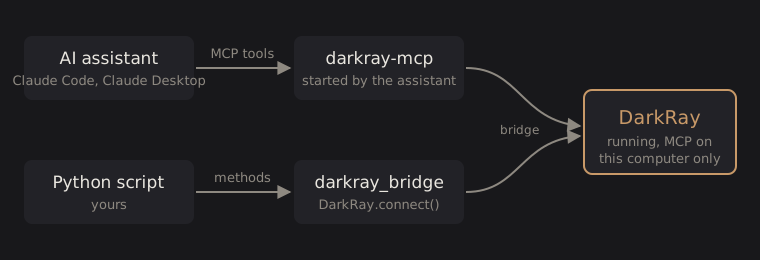
Section titled “Two ways in”- An AI assistant (Claude Code, Claude Desktop, or another app that speaks MCP) starts
a small program,
darkray-mcp, that passes its tool calls to DarkRay. See Connect an AI assistant. - A Python script uses the
darkray_bridgepackage, with one method per MCP tool. See The Python client.
Both talk to DarkRay over a connection that stays on this computer.
Turn it on
Section titled “Turn it on”DarkRay answers only while MCP is on:
- Click MCP at the right end of the status bar. It turns green, and the label beside it reads Ready, or In use while an assistant or script is connected. This lasts until DarkRay closes.
- To have it on every time DarkRay starts, turn on Turn MCP on at launch in File › Preferences › General, on the MCP card. It takes effect at the next launch.

Click Ready or In use to open the Console’s MCP card, which lists what assistants and scripts did, refusals in red.
A first script
Section titled “A first script”from darkray_bridge import DarkRay
with DarkRay.connect() as app: picks = [p.id for p in app.iter_photos("rating:>=4 camera:X-T5")] app.set_edits(picks, adjust={"exposure_ev": 0.33}) app.update_photos(picks, flag="pick", add_keywords=["portfolio"]) job = app.export_photos(picks, settings={"format": "jpeg", "resize": True, "long_edge": 2048}) files = job.wait().result["files"]This finds every photo of four stars or more from an X-T5, brightens each by a third of a stop from its own exposure, flags and tags them, and exports them as 2048-pixel JPEGs.
Technical details: how it works
While MCP is on, DarkRay listens on 127.0.0.1 (this computer only) and writes the port and a
fresh random token to ~/.darkray/bridge.json. Every connection must start by presenting
that token. darkray-mcp and darkray_bridge read the file to find DarkRay; they need only
the Python standard library (3.10 or later). Requests run on DarkRay’s own window thread,
through the commands the menus use; slow work (previews, exports, imports, merges) runs in
the background as it does when you start it yourself. See
The bridge protocol for the details.