
Jobs and previews
Exports, imports and merges can take minutes, so their methods return a job you can follow. Previews come back as JPEG images you can save.
Follow a job
Section titled “Follow a job”export_photos, import_photos and merge_photos start the work in DarkRay, wait up to
20 seconds, and return a Job as it then stands: done with its result when it ended in
time, else running.
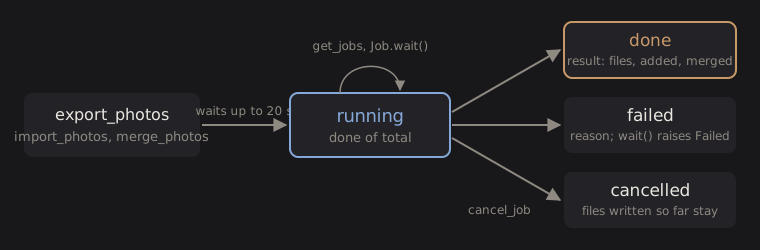
A Job has these fields:
| Field | Holds |
|---|---|
id |
Its name, such as "job-7", valid until DarkRay quits |
kind |
export, import or merge |
state |
running, done, failed or cancelled |
done, total |
Items finished and items in all (photos, or merge groups) |
result |
What it produced, once it ends |
reason |
Why it failed |
running |
True while state is running |
The job also shows in DarkRay’s status bar like one you started yourself, and you can cancel it there.
Wait for the end
Section titled “Wait for the end”job.wait() checks on the job every half second until it ends, and returns it.
progress is called with the job at every check; timeout stops waiting after that many
seconds and returns the job still running. If the job fails, wait() raises Failed with
the reason. A cancelled job returns normally, so check state:
from darkray_bridge import DarkRay

def report(job) -> None:    """Show progress at every poll."""    print(f"{job.kind}: {job.done} of {job.total}")

with DarkRay.connect() as app:    picks = [photo.id for photo in app.iter_photos("flag:pick")]    job = app.export_photos(picks, settings={"format": "tiff", "tiff_encoding": "display"})
    # Wait up to ten minutes; wait() raises Failed if the job fails.    job.wait(timeout=600, progress=report)    if job.running:        print("Still running; check again later with job.refresh()")    elif job.state == "cancelled":        print("Cancelled; files written so far:", job.result["files"])
Check on a job yourself
Section titled “Check on a job yourself”job.refresh() reads the job’s state again and returns it:
import time
from darkray_bridge import DarkRay
with DarkRay.connect() as app:    job = app.import_photos(r"E:\Card\DCIM")
    # Follow the job yourself instead of wait(): refresh() reads its state again.    while job.running:        time.sleep(2)        job.refresh()    print(job.state, job.result)
app.get_jobs() lists every job started through MCP since DarkRay opened, by any assistant
or script; pass ids to get only those.
Stop a job
Section titled “Stop a job”job.cancel() stops it, and app.cancel_job(id) does the same by id. Files already
written stay; a merge stops at its next stage.
from darkray_bridge import DarkRay
with DarkRay.connect() as app:    everything = [photo.id for photo in app.iter_photos("")]    job = app.export_photos(everything, settings={"format": "jpeg", "resize": True, "long_edge": 1024})
    # Give it five minutes, then stop it; files already written stay.    job.wait(timeout=300)    if job.running:        job.cancel()
What a job produces
Section titled “What a job produces”| Kind | result |
|---|---|
export |
files: the paths written; failed: {file, reason} for each photo that failed; notes: {file, notes} |
import |
added: how many photos were added; summary: a sentence |
merge |
merged: {group, id, file} for each new photo; failed: {group, reason}; notes: {group, note} |
A photo or group that fails is listed and the others go on. An export or merge in which every
one failed ends failed: wait() raises Failed, and job.result still lists each reason.
Save a preview
Section titled “Save a preview”app.get_preview(id) renders a photo as edited, as DarkRay shows it (cropped and turned),
and returns a Preview:
- With
size(256 to 2048, 1024 by default), the whole photo at that long edge. - With
region, a box given asx,y,wandhfrom 0 to 1 across the photo, rendered at full resolution, at most 1024 pixels: for judging noise, sharpness, fringing and focus.
A Preview holds jpeg (the file’s bytes), width, height, region and preparation.
preview.save(path) writes the JPEG and returns the path:
from pathlib import Path
from darkray_bridge import DarkRay
out = Path.home() / "Pictures" / "contact-sheet"out.mkdir(parents=True, exist_ok=True)
with DarkRay.connect() as app: for photo in app.iter_photos("rating:5 date:2026-06"): preview = app.get_preview(photo.id, size=512) # save() writes the JPEG bytes and returns the path. preview.save(out / f"{photo.id}.jpg")Technical details: how previews and jobs are made
A whole-photo preview comes from DarkRay’s preview cache when it holds the photo’s current edits at that size; otherwise it is rendered from the proxy as thumbnails are, or at full resolution for a small photo. A region always renders at full resolution. Previews are display-referred JPEGs at quality 85, and use the GPU one at a time with DarkRay’s other work, so a RAW that isn’t on screen takes a few seconds to decode.
preparation["state"] is ready, preparing, failed, cancelled or unprepared.
Jobs run through the same export, import and merge code as the menus, without their dialogs.
wait() and refresh() poll get_jobs; protocol 1 sends no progress messages.