
Add depth with Clarity
Clarity adds punch and depth to textures and small forms, like rock, foliage and fabric. Unlike many clarity sliders, it leaves no dark or bright halos along strong edges.
Use Clarity
Section titled “Use Clarity”Open General in the right column and drag Clarity. It sits in the Tone Mapping group, below Contrast. The range is -100 to +100 and the default is 0.
- Positive values add local contrast.
- Negative values soften small detail and keep edges crisp. At -100 fine detail is flattened fully.

Clarity follows the General section’s power button: bypass the section and Clarity goes too. It works on the layer selected in the Layers pane. Use the Base for the whole photo, or a masked layer to add depth to one area. See Layers.
What it changes
Section titled “What it changes”Clarity looks at how much a pixel differs from its surroundings and treats three cases differently:
- Texture and form (small differences) are boosted.
- Strong edges, like a sunlit wall against shadow, pass through unchanged. That is why there are no halos.
- Large areas, like a whole lit hillside, are left alone. Boosting those reads as a glow.
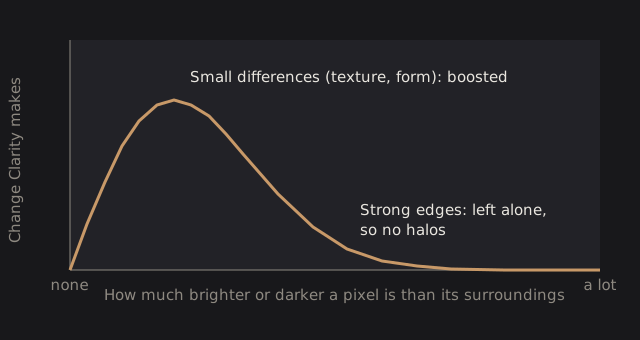
Clarity is strongest in the midtones and fades out in deep shadows and in bright highlights. Color stays as it was: hue and saturation don’t shift as areas get lighter or darker.
The effect looks the same at any zoom level and on any preview size, because the size of the detail it affects is a fraction of the photo’s long side, not a number of pixels.
Technical details: the filter
Clarity is a local Laplacian filter on Oklab lightness. Differences smaller than about 0.06 in lightness are scaled; larger ones pass through. At +100 the gain on small differences is 1.5 times (so detail is multiplied by up to 2.5), and at -100 it removes them. The affected detail fades out between 1% and 2% of the photo’s long edge. The new lightness is applied as a local exposure change, so linear RGB scales together and values above white survive.
Clarity runs after Atmosphere and before Sharpen, in linear light, before the display transform. The finest detail it boosts includes fine noise, so check a noisy photo at 100% zoom.