
Mask by distance
A depth range mask selects things by how far they are from the camera. Use it to darken the distant mountains, warm up the foreground, or add haze only to the background.
Depth Range needs a depth model that you add yourself. None comes with DarkRay. Add one in Preferences › AI Models, as described in Bring your own model. Until then the menu item reads Needs a model…, and choosing it opens that page. With Auto chosen for Depth, DarkRay uses the first depth model you added.
Make a depth mask
Section titled “Make a depth mask”- Click the AI button next to Layer and choose Depth Range from its arrow list. To add it to an existing layer, right-click the layer, choose Add Mask (or Add), then Depth Range.
- The mask is added at once. If this is the first time the photo needs its depth, the status bar says “computing the photo’s depth…” and the mask selects nothing until that finishes.
- Move the band in the mask’s card. The mask overlay shows what is selected.

Set the band
Section titled “Set the band”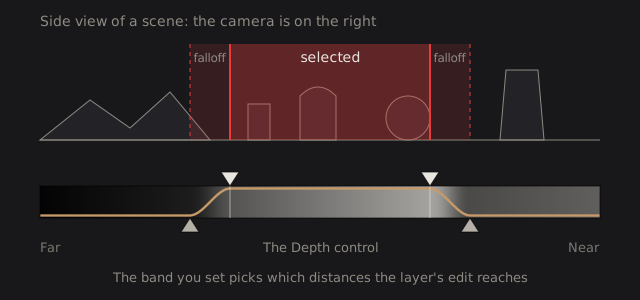
The Depth control is a strip from Far on the left to Near on the right. It works exactly like the Luminance control: two top keys set the cutoffs, two bottom keys set how soft each edge is, and you can slide the whole band. A new depth mask starts on the far half, with a soft edge toward the near side.
Distance here is relative, not measured in meters. The strip runs from the farthest to the nearest thing the model sees in this photo, so the same setting on two photos can pick different real distances.
Depth masks have no Expand or Feather. Soften the edges with the band’s falloff, or combine the mask with a painted one (see Use masks).
Technical details: where the depth comes from
DarkRay estimates depth with the depth model you added. It runs once per photo, at the input size the model asks for. The result is saved in the cache folder, so a restart, an export or another session reads it instead of computing it again. Resetting a photo’s edits leaves it alone, because depth is a fact about the photo and not an edit.
A model that gives distance instead of nearness is turned into nearness first (its Invert direction setting), and the edges are then snapped to the photo’s own edges. A depth mask stores only its band and the name of the model, and picks from the photo’s saved depth at render time. That is why moving the band needs no new model run. If you change the depth model in Preferences, the depth is computed again for the new model.
The depth map is made in the lens-corrected frame, and a lens change recomputes or reuses the depth for that frame.